---
title: How to Add Your HTML Email Signature to Your Email Account
description: You can export your email signature as an HTML file and add it to your email account to keep your branding and formatting consistent across emails.
---
[Skip to content](https://support.maxadesigns.com/knowledge/how-to-add-your-html-email-signature-to-your-email-account#main-content)

Open main navigation
Close main navigation
How can we help?
- There are no suggestions because the search field is empty.
1. [Knowledge Center Home](https://support.maxadesigns.com/knowledge?hsLang=en)
2. [Design Customization](https://support.maxadesigns.com/knowledge/design-customization?hsLang=en)
3. [HTML & Email Marketing](https://support.maxadesigns.com/knowledge/design-customization?hsLang=en#html-email-marketing)
# How to Add Your HTML Email Signature to Your Email Account
## You can export your email signature as an HTML file and add it to your email account to keep your branding and formatting consistent across emails.
**Steps**
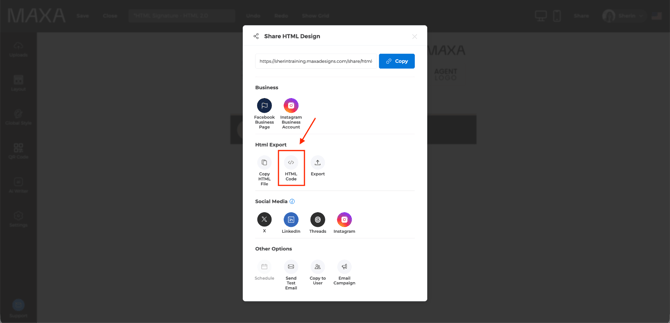
1. Once your email signature design is ready, click **Share**
2. Under the **HTML export** options, select **HTML Code**
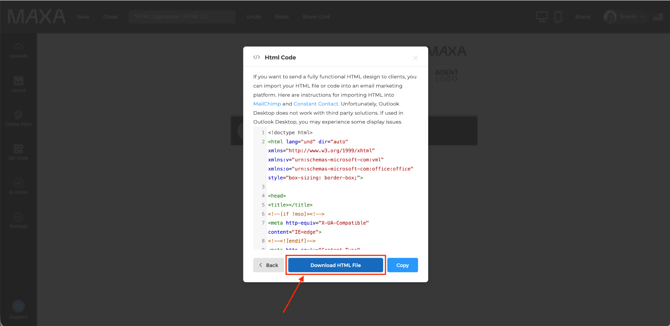
3. In the next window, click **Download HTML File**
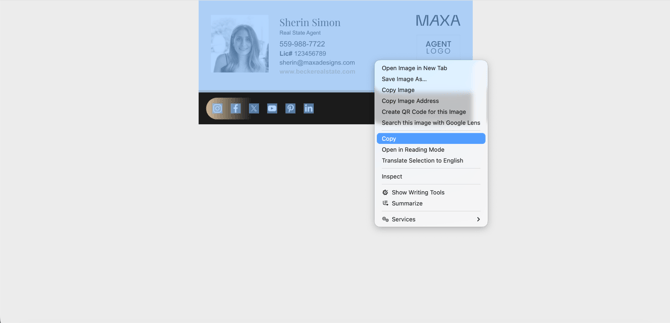
4. Open the downloaded file and copy all of the content
**Add the Signature to Your Email Account**
1. Go to your email account settings (for example, Gmail). **Note:** Steps may vary slightly depending on your email provider, but the process of pasting the HTML content is the same.
2. Go to your email account **Settings** and locate the section where you can **edit your email signature**.
3. Paste the copied HTML content into the signature field
4. Click **Save**
- [Getting Started](https://support.maxadesigns.com/knowledge/getting-started?hsLang=en#main-content)
- [Setting Up Your Account](https://support.maxadesigns.com/knowledge/getting-started?hsLang=en#setting-up-your-account)
- [Dashboard Tips & Tricks](https://support.maxadesigns.com/knowledge/getting-started?hsLang=en#dashboard-tips-tricks)
- [Design Customization](https://support.maxadesigns.com/knowledge/design-customization?hsLang=en#main-content)
- [Editing Designs](https://support.maxadesigns.com/knowledge/design-customization?hsLang=en#editing-designs)
- [Automated Marketing Packages (AMP)](https://support.maxadesigns.com/knowledge/design-customization?hsLang=en#automated-marketing-packages-amp)
- [Managing MLS Info](https://support.maxadesigns.com/knowledge/design-customization?hsLang=en#managing-mls-info)
- [HTML & Email Marketing](https://support.maxadesigns.com/knowledge/design-customization?hsLang=en#html-email-marketing)
- [Sharing & Exporting Designs](https://support.maxadesigns.com/knowledge/design-customization?hsLang=en#sharing-exporting-designs)
- [Market Stats](https://support.maxadesigns.com/knowledge/design-customization?hsLang=en#market-stats)
- [QR Code](https://support.maxadesigns.com/knowledge/design-customization?hsLang=en#qr-code)
- [AI Features](https://support.maxadesigns.com/knowledge/design-customization?hsLang=en#ai-features)
- [Print & Mailing List Tool ](https://support.maxadesigns.com/knowledge/print-mailing-list-tool?hsLang=en#main-content)
- [Downloading](https://support.maxadesigns.com/knowledge/print-mailing-list-tool?hsLang=en#downloading)
- [Compliance](https://support.maxadesigns.com/knowledge/compliance?hsLang=en)
- [Design Concierge](https://support.maxadesigns.com/knowledge/design-concierge?hsLang=en)
- [General](https://support.maxadesigns.com/knowledge/general?hsLang=en)
- [Resources for Staff / Office Admins](https://support.maxadesigns.com/knowledge/resources-for-staff-office-admins?hsLang=en)
- [Resources for Marketing Team](https://support.maxadesigns.com/knowledge/resources-for-marketing-team?hsLang=en)
- [Still Need Help?](https://support.maxadesigns.com/knowledge/still-need-help?hsLang=en)
[](https://www.maxadesigns.com/)
#1 Rated Marketing Center
We make marketing leaders superhuman
© Maxa Software, Inc.